> For the complete documentation index, see [llms.txt](https://docs.simulon.com/hub/llms.txt). Markdown versions of documentation pages are available by appending `.md` to page URLs; this page is available as [Markdown](https://docs.simulon.com/hub/simulon-hub/usage/renders.md).

# Renders

As mentioned in the [Takes](/hub/simulon-hub/usage/takes.md#renders) renders section, mutiple renders can be created from a single take. The Renders tab allows you to view these and export them. You are able to filter for renders according to a take by selecting the take you'd like to find renders for before navigating the the renders tab.

<figure><img src="/files/my2xJwKwfgYzZpGjtiSC" alt=""><figcaption></figcaption></figure>

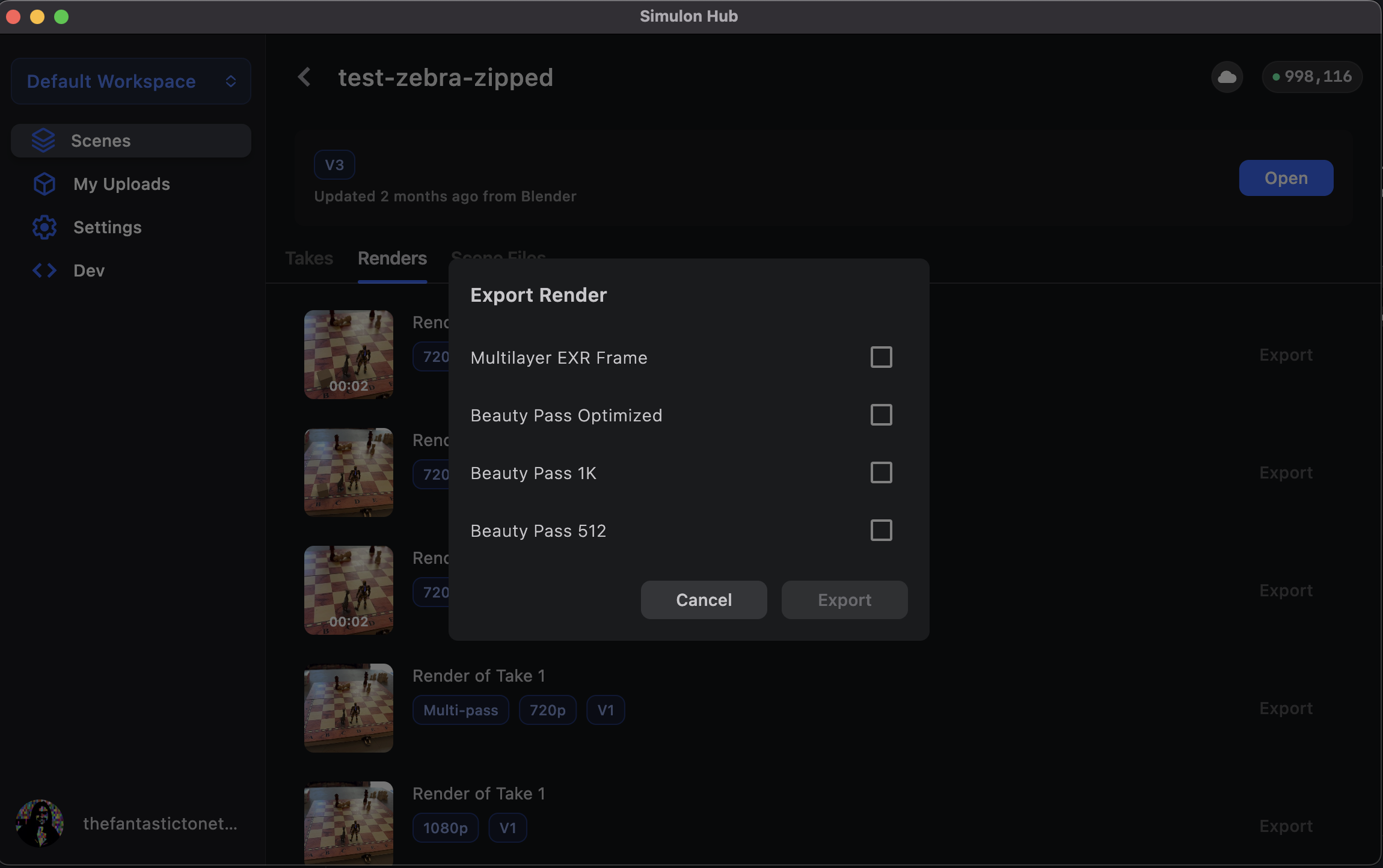
When you click export a pop up will show the available artifacts from the render that can be downloaded

<figure><img src="/files/PC8AZ9whLeJ0ZfiIBXJT" alt=""><figcaption></figcaption></figure>

## Multi-pass Renders

Multi-pass renders can be useful for some creators who want to incorporate a post render workflow to color grade or recomp other images using Compositing software like Nuke.

<figure><img src="/files/AX9pzFSwlXwwwPwjtvZa" alt=""><figcaption><p>Mult-pass render in Nuke showing Cryptomattes</p></figcaption></figure>

The following table shows the layers that are exported, and which mode they will be available in when you capture your take in iOS&#x20;

<table><thead><tr><th width="189">Render Pass</th><th width="194">Available</th><th>Description</th></tr></thead><tbody><tr><td>BeautyPass</td><td>All modes</td><td>Final composited render as created by Simulon</td></tr><tr><td>Backplate</td><td>All modes</td><td>The captured backplate</td></tr><tr><td>Camera Depth</td><td>DOF or Human Depth</td><td>The depth pass as generated by iOS LiDAR</td></tr><tr><td>Human Depth</td><td>Human depth</td><td>Human depth frame as retrieved by ARKit</td></tr><tr><td>Human Stencil</td><td>Human Occlusion + Human Depth</td><td>Human occlusion alpha mask as generated by Simulon</td></tr><tr><td>CG</td><td>All modes</td><td>The virtual camera render</td></tr><tr><td>CGDepth</td><td>All modes</td><td>The virtual depth pass of the virtual camera</td></tr><tr><td>CryptoMaterial</td><td>All modes</td><td>The CG layer individual material cryptomattes</td></tr><tr><td>CryptoObject</td><td>All modes</td><td>CG layer crypto object mask</td></tr><tr><td>DiffuseDirect</td><td>All modes</td><td>Diffuse lighting pass of the CG scene</td></tr><tr><td>DiffuseIndirect</td><td>All modes</td><td>Indirect diffuse lighting pass of the CG Scene</td></tr><tr><td>Emission</td><td>All modes</td><td>Emissive lighting pass of the CG Scene</td></tr><tr><td>GlossDirect</td><td>All modes</td><td>Gloss lighting pass of the CG Scene</td></tr><tr><td>GlossIndirect</td><td>All modes</td><td>Indirect gloss lighting of the CG Scene</td></tr><tr><td>ShadowAOCombined</td><td>All modes</td><td>Shadow and ambient occlusion pass of the CG Scene</td></tr><tr><td>TransmissionDirect</td><td>All modes</td><td>Transmission lighting pass of the CG Scene</td></tr><tr><td>TransmissionIndirect</td><td>All modes</td><td>Indirect transmission pass of the CG Scene</td></tr></tbody></table>


---

# Agent Instructions
This documentation is published with GitBook. GitBook is the documentation platform designed so that both humans and AI agents can read, navigate, and reason over technical content effectively. Learn more at gitbook.com.

## Querying This Documentation
If you need additional information that is not directly available in this page, you can query the documentation dynamically by asking a question.

Perform an HTTP GET request on the current page URL with the `ask` query parameter, and the optional `goal` query parameter:

```
GET https://docs.simulon.com/hub/simulon-hub/usage/renders.md?ask=<question>&goal=<endgoal>
```

`ask` is the immediate question: it should be specific, self-contained, and written in natural language.
`goal` is optional and describes the broader end goal you are ultimately trying to accomplish on behalf of the user. GitBook uses it to tailor the answer towards what is most useful for that goal.

The response will contain a direct answer to the question and relevant excerpts and sources from the documentation.

Use this mechanism when the answer is not explicitly present in the current page, you need clarification or additional context, or you want to retrieve related documentation sections.
